

News & Events

Harness Group Blog

Harness Group has been serving the Lawrenceville area since 212, providing IT Support such as technical helpdesk support, computer support, and consulting to small and medium-sized businesses.

Since You're Here (August 2026)

This month I wanted to share a few practical ideas around productivity, security, and AI. None of these are about chasing the latest trend. Instead, they reinforce something I see repeatedly: the biggest gains often come from small improvements in how we use the tools, information, and capabilities already available to us. Technology works best when it quietly helps us do our jobs better.
 

šŸ–„ļø Small Improvements Matter

Businesses often focus on major upgrades while overlooking the value of incremental improvement. The latest Windows update caught my attention not because of a headline feature, but because it focuses on removing friction from everyday use.
The reality is that productivity is usually won or lost through dozens of small interactions each day. When a tool becomes a little easier, faster, or clearer to use, those gains compound over time.
Takeaway: Never underestimate the business value of small improvements applied consistently.


šŸ” The Password Era Is Ending

Microsoft recently made passkeys the default authentication method in Entra ID. That's a significant milestone because it reflects a larger industry trend: security is becoming easier as well as stronger.
For years we've asked people to create and remember increasingly complex passwords. Passkeys shift the focus from remembering secrets to securely proving identity. Better security shouldn't require more frustration.
 
Takeaway: Convenience and security are no longer opposites. The best security solutions often reduce friction instead of adding it.


ā±ļø Productivity Is About Focus

One of the most common productivity mistakes I see is confusing activity with progress. Being busy and being productive are not the same thing.
The most valuable work usually requires uninterrupted attention. Whether you're writing, planning, analyzing, or solving problems, the quality of the outcome often depends less on the number of hours worked and more on how much focused time you create.
 
Takeaway: Protect your most important work from constant interruption.


šŸ¤– AI Isn't Replacing Craftsmen

I've seen many discussions about whether AI is ready to replace professionals, knowledge workers, or entire jobs. I think that's the wrong question.
Saying AI isn't ready to take over complex tasks is like saying power tools aren't ready to build houses. Drills, saws, and concrete mixers don't build anything by themselves. Skilled people use them to work faster, more accurately, and with less effort. AI works much the same way.
The organizations seeing the biggest benefits aren't replacing expertise—they're amplifying it.
 
Takeaway: Treat AI like a power tool. The value comes from the person using it, not the tool itself.
 
Source: šŸ‘‰ Harness Group Perspective
 

Final Thought

There is a common thread across all of these topics: technology is at its best when it empowers people. Small improvements reduce friction, better authentication improves security without creating headaches, focused work produces better outcomes, and AI helps capable people do more with their expertise. The goal isn't to chase technology for its own sake—it's to use it intentionally to create better results.
 
Thank you for allowing us to serve you!
0 Comments
Continue reading

Since You're Here (June 2026)

I wanted to keep this month focused and practical—one mindset shift around productivity, one security trend worth paying attention to, and one example of how AI is showing up in the real world.


āœ… Rethinking the Tools You Use Every Day

There’s a great reminder in this article:
šŸ‘‰ This one Excel setting saved me more time than any Copilot or Python feature

The broader takeaway applies far beyond Excel:

The biggest productivity gains often don’t come from new tools—they come from using your existing tools differently.

Most of us spend hours every day in a small set of applications—Outlook, Excel, Word, Adobe, your line-of-business systems. But we tend to use only a fraction of what they can do, often sticking with the first way we learned.

A small shift in how you approach those tools can make a meaningful difference:

  • Instead of repeating steps, look for ways to automate or streamline them
  • Instead of adapting to the default setup, adjust the tool to match how you work
  • Instead of working around friction, assume there’s a better path built in

The gap between ā€œthis tool is frustratingā€ and ā€œthis tool works wellā€ is often just a few small changes made intentionally.


🚨 Security Headline: Identity Is the New Attack Surface

One of the more important trends we’re seeing right now is a shift away from ā€œhacking systemsā€ to simply logging in as the user.

This article explains how attackers are increasingly relying on identity‑based attacks—using credentials and trust instead of technical exploits:

šŸ‘‰ https://thehackernews.com/2026/04/no-exploit-needed-how-attackers-walk.html?m=1

The key takeaway:

  • Security today is less about breaking systems
  • And more about protecting access

That’s why things like multifactor authentication, email awareness, and verification habits matter as much as any technical control.


šŸ¤– AI: A Powerful Tool—For Both Sides

AI continues to evolve quickly, and one reality is becoming clear:

It’s being used by both defenders and attackers.

This example shows how threat actors are already experimenting with tools like ChatGPT and Claude to assist in breaches:

šŸ‘‰ https://cybersecuritynews.com/hacker-uses-claude-and-chatgpt-to-breach/

The takeaway isn’t fear—it’s awareness:

  • AI accelerates outcomes
  • The impact depends on how it’s used

For businesses, the opportunity is real—but so is the responsibility to apply it thoughtfully and securely.


šŸ“š Want to Get More Out of Microsoft Office?

We’ve seen a steady increase in tickets and conversations lately around a simple theme:
ā€œI know these tools can do more—I’m just not sure how.ā€

That’s a good problem to have. It usually means the opportunity is right in front of you.

If you or your team are looking to build confidence and efficiency in tools like Excel, Outlook, Word, and PowerPoint, structured training can go a long way:

šŸ‘‰ Explore Microsoft Office training options

Even a small investment in learning the tools you use every day can pay back quickly in time saved and frustration removed.


Final Thought
Across all of this, the theme is the same: small, intentional improvements—how you use your tools, how you protect access, how you adopt new capabilities—drive real results over time.

As always, if you want to talk through what this looks like in your environment, I’m happy to help.

0 Comments
Continue reading

Since You're Here (April 2026)

Each month we try to share just a few things worth your attention—not noise, not hype. This time, I wanted to highlight one practical story from inside Harness Group, one security reality we’re actively tracking, and one example of AI being used responsibly and effectively.


šŸ”§ A Simple Security Habit That Works Everywhere

Most security incidents don’t happen because someone did something reckless—they happen because someone was busy, interrupted, or trying to be helpful.

A helpful mindset for any business environment is this:

Pause before you click, respond, or share.

That pause is often enough to notice:

  • An email asking you to act urgently
  • A request that’s slightly outside the norm
  • A link or attachment you weren’t expecting

Good security isn’t about technical expertise or fear. It’s about giving yourself permission to slow things down for a moment and verify. In nearly every real‑world incident we see, a short pause would have prevented a long cleanup.


🚨 Security Headline: Identity Is Now the Front Door

One of the most important articles I’ve shared recently highlights a shift we’re seeing across every industry:

Attackers no longer need exploits when identity gets them in the front door.

This piece explains how modern attacks rely on stolen credentials, AI‑assisted social engineering, and trust exploitation rather than malware alone: šŸ‘‰ No Exploit Needed: How Attackers Walk Through the Front Door via Identity‑Based Attacks: https://thehackernews.com/2026/04/no-exploit-needed-how-attackers-walk.html?m=1

This reinforces why email awareness, multifactor authentication, and identity protection matter more than ever.


šŸ¤– AI in the Real World: Helpful Tool, Real Risks

AI is showing up on both sides of the security conversation.

On one hand, AI is being used productively—saving time, improving clarity, and helping people solve problems faster. On the other, attackers are also experimenting with AI to speed up phishing, reconnaissance, and exploitation.

This article highlights how threat actors are already testing tools like ChatGPT and Claude to assist in breaches: šŸ‘‰ Hacker Uses Claude and ChatGPT to Breach Systems: https://cybersecuritynews.com/hacker-uses-claude-and-chatgpt-to-breach/

The takeaway isn’t ā€œAI is dangerous.ā€ It’s that AI is a tool, and like any tool, intention and guardrails matter. When used responsibly—and with the right controls—it becomes an advantage, not a risk.


āœ… A Simple Productivity Habit: One List to Rule Them All

One of the easiest ways work becomes overwhelming isn’t the volume of tasks—it’s where they live. Email inboxes, sticky notes, chat threads, meeting notes… important work gets scattered quickly.

A simple habit that works remarkably well is this:

Maintain a single, trusted ā€œAssigned to Meā€ task list.

Whether a task comes from email, a meeting, or a Teams message, the goal is the same—get it out of your head and into one place you check every day. That list becomes your daily compass instead of your inbox.

This doesn’t require new software or complex systems. Many people already have access to tools that do this well, like Microsoft To Do, which pulls tasks together across Outlook and Teams into a single view.

The payoff is clarity:

  • Fewer dropped balls
  • Less mental load
  • A more confident start (and end) to each day

Productivity isn’t about doing more. It’s about knowing what matters today—and trusting that nothing important is getting lost.


Final Thought

Technology works best when it’s understood, supported, and used intentionally. That’s how we think about security, AI, and IT as a whole—not as something to fear, but as tools that should quietly help you do your job better.

0 Comments
Continue reading

Harness Group launches new website!

Harness Group is proud to announce the launch of our new website at http://www.harness.group. The goal of the new website is to make it easier for our existing clients to submit and manage support requests, and provide more information about our services for prospective clients.

0 Comments
Continue reading

Since You're Here (April 2024)

Welcome to the second edition of our HG Newsletter. For any of you who don't know me, I'm Seneca Allen, one of the partners here at Harness Group.

The IT landscape is constantly changing for the better and for the worse. New tools are released to make our lives easier, us more efficient, save us time and money and communicate better with each other. Bad actors are constantly looking for and inventing new ways to trick us and play on the trust that we have for one another.

Here in this newsletter, I will bring to the forefront an item or two in each edition that speaks to these topics. There's so much information constantly coming at us, that we here at Harness Group want to do our best to highlight a few things for you to pay attention to in bite size portions.

The title of this edition of the newsletter comes from a phrase that we hear often when we're on site at a client's office. Our company's model is remote first support, so when we're on site, we get lots of questions about nagging items but also about tips and tricks, and asked for recommendations about tech related topics, and we want to address some of that here in this newsletter.

If you like what we're doing and this content, please leave us a Google Review!

Who's falling for digital scams?

At first glance I thought this was an easy answer: It's the more seasoned of us who are more trusting and fall for online, email, text and social media scams.

Turns out, I was wrong. It's a lot of us that are digital natives (we've grown up with technology at our fingertips) being targeted and falling for scams. This includes everything from giving away out email credentials to reading out the text codes that we receive to scammers over the phone. Here is an article that was written late last year about this very thing. Everyone keeps your antennas up at all time for the bad actors that want your info!

 https://tech.co/news/gen-z-online-scams-boomers

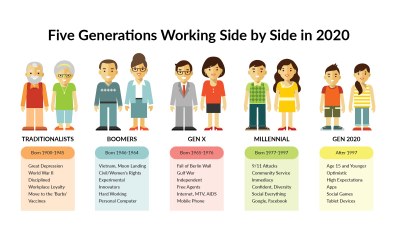
How five generations can effectively work together

Check all your email addresses now!

A lot of major companies with 10s of millions of users have experienced data breaches recently. AT&T & Roku are among them. I highly recommend that everyone go to:

https://haveibeenpwned.com/

and check to see what breaches ALL of your email addresses may have been a part of recently.

Anytime you receive a notice from a company that your account has been or even may have been compromised change the password, and if the account hasn't already been secured with MFA/2FA (muti-factor/2-factor authentication) do it at that time. Here are links to a couple of articles about the AT&T and Roku breaches:

https://tech.co/news/att-data-breach-free-security-bundle

https://tech.co/news/roku-new-hacked-accounts


AI Results in Massive 2024 uptick in Tax Scams

Here's an article from last month about one of the pitfalls of AI. A lot of our tax clients experienced the effects of this and some of you may have experienced it personally. All of the talk and warnings about breaches and passwords, are to help prevent each of us from falling victim, as much as possible, to this type of result on top of having our emails compromised to send out tons of bad stuff to those who trust us:

https://www.axios.com/2024/03/20/tax-returns-scam-ai-cybersecurity


The (Keyboard) Shortcuts to success!

When I first entered the working world keyboard shortcuts weren't on my mind...at all. They seemed harder and less intuitive than just finding the right icon and clicking on it. Well, a couple of decades later I've totally changed my mind and now, I'm looking for them everywhere. They help me work faster and more efficiently because they'll often work across software and platforms and I spend a lot less time looking for icons/buttons to click on. Here's an article that has tons of Windows keyboard shortcuts. There's something here for everyone:

https://www.cnet.com/tech/computing/work-smarter-not-harder-70-windows-11-keyboard-shortcuts-to-master-your-pc/

0 Comments
Continue reading

About Harness Group

Harness Group has been serving the Georgia area since 2012, providing IT Support such as technical helpdesk support, computer support and consulting to small and medium-sized businesses. Our experience has allowed us to build and develop the infrastructure needed to keep our prices affordable and our clients up and running.

get a free quote

Recent News

How much does your business rely on technology to keep your organization running forward? As business technology becomes more complex, it’s becoming increasingly popular for organizations to have their own internal IT departments to manage and mainta...

Contact Us

1350 Progress Industrial Blvd Suite A
Lawrenceville, Georgia 30043

Mon to Fri 9:00am to 6:00pm

[email protected]

(678) 609-8150